iOS & iPadOS 18 • Local-First • 100% Free

One career profile.
A tailored resume for every role.

CVBuilderKit solves the resume fatigue problem. Maintain your complete work history in one reusable master profile, generate targeted ATS-compliant resumes in seconds, and export publication-ready vector PDFs with private Apple iCloud sync.

No Accounts or Passwords
Private iCloud Sync
Vector PDF (A4 & US Letter)
No Watermarks or Paywalls
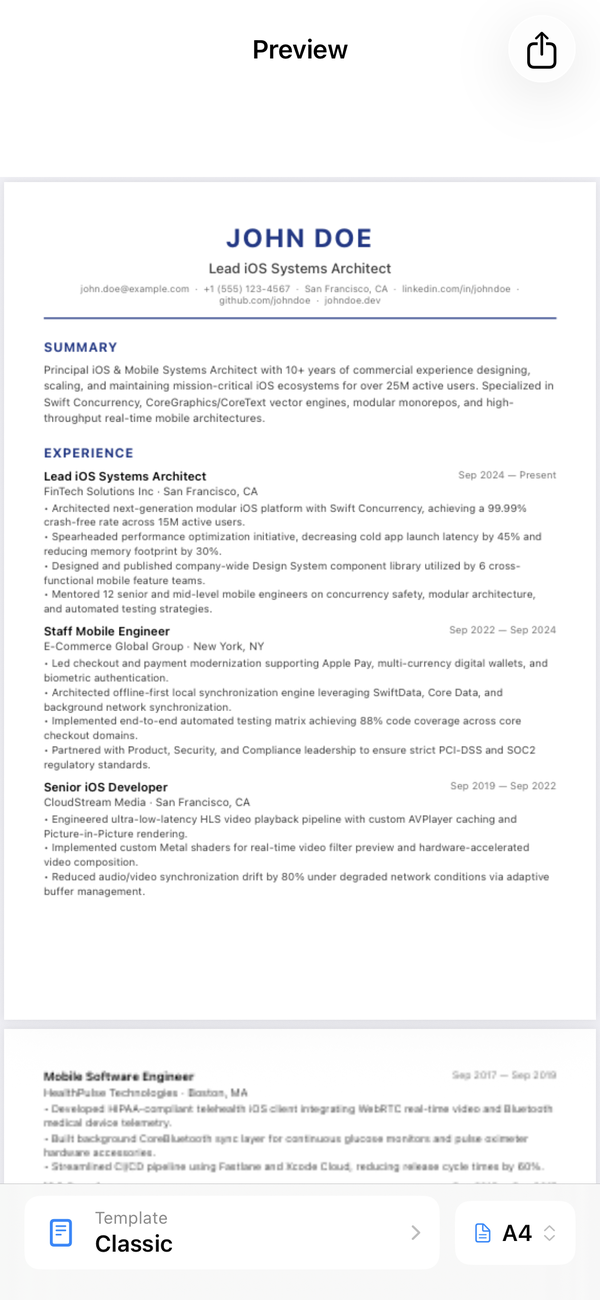
CVBuilderKit Resume PDF Preview on iOS
Interactive Real-Time Preview Native SwiftUI
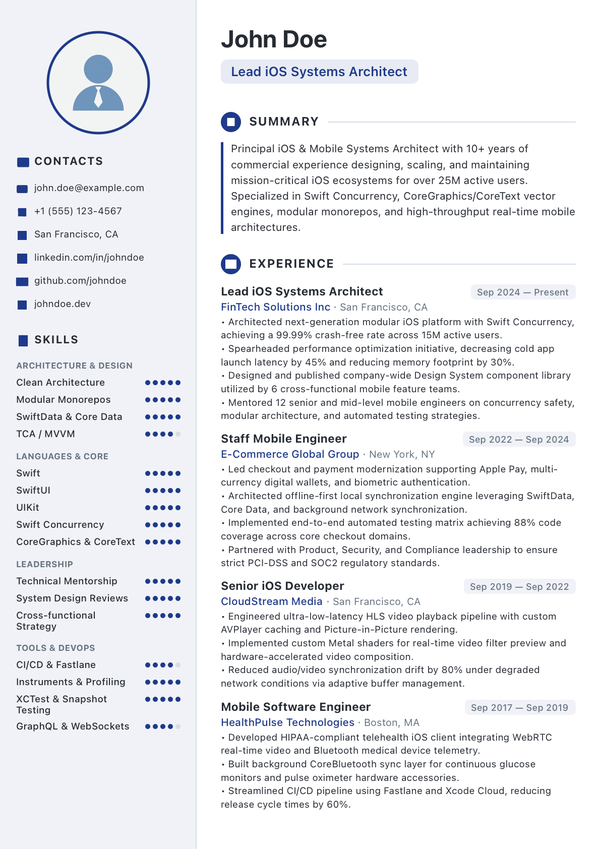
CVBuilderKit Modern ATS PDF Template
Generated Vector PDF (Modern Template) ATS-Ready
Architecture & Features

Built specifically for thoughtful job applicants

Unlike bloated web tools that trap your career data behind paywalls, CVBuilderKit is a native Apple app designed around intelligent reuse, local data control, and recruiter compatibility.

Master Career Profile

Record every job, accomplishment, degree, skill, and project in your Master Career Profile. When your profile is updated, linked details automatically flow to all your resume variants.

Field Override Protection

Customize bullet points or summaries specifically for a target employer. Your tailored edits are protected with override tracking and will never be overwritten until you explicitly reset them.

100% Private to You

Your career history is personal. We don't have database servers, login accounts, or user profiling. Your data lives securely in local SwiftData storage and syncs via your private Apple iCloud account.

Engineered for ATS Parsers

Applicant Tracking Systems choke on flat image PDFs and complex floating layers. CVBuilderKit generates pure, searchable CoreText vector streams guaranteed to parse cleanly into corporate hiring systems.

Multiple Specialized Profiles

Pursuing different career tracks? Maintain independent profiles (e.g., "Engineering Management", "Hands-on iOS", "Advisory") with clean profile switching and independent resume associations.

Instant Share & Print

Instantly switch between A4 (international) and US Letter paper formats. Share your PDF via AirDrop, Apple Mail, Messages, or Files with zero waiting and zero third-party branding.

5 Publication-Grade Layouts

Tested with recruiters. Styled to stand out.

Choose from five carefully crafted templates designed to balance high-signal typography, white space, and applicant tracking system compliance.

Two-Column / Visual Balance

Modern Template

Sleek split-column layout featuring an elegant sidebar for personal details, core competencies, and profile photo, with maximum breathing room for career milestones.

  • Balanced two-column structure with distinct sidebar
  • Optional circular profile photo container
  • Visual skill bars and category grouping
  • ATS-compliant CoreText vector text rendering
Modern Template Resume Preview
Workflow

Create your first targeted resume in 3 steps

Say goodbye to copying and pasting old Word documents or fighting with broken formatting in online editors.

01

Enter Profile Once

Use our quick 3-step onboarding to input your contact details, work experience, education, skills, and projects. This forms your persistent Master Career Profile.

02

Create Targeted Variants

Tap to spawn a new resume for a specific job application. Selectively include relevant jobs, reorder skills, and customize descriptions with safe override protection.

03

Preview & Export Vector PDF

Pick your layout template, choose your accent color, select A4 or US Letter, and instantly export an ATS-compliant PDF ready to email or submit directly to job portals.

Why Choose CVBuilderKit

A modern, honest alternative

Compare how CVBuilderKit matches up against traditional web builders and graphic tools.

Feature CVBuilderKit Canva Novoresume / Zety Word / Google Docs
Price & Business Model ✓ 100% Free Baseline Freemium / Watermarks ✗ $15–$30/month Office Subscription
ATS Scanner Compliance ✓ 100% Searchable Vector ✗ Often flattens text Variable Poor if using tables
Master Profile & Variant Linking ✓ Smart Overrides & Reset ✗ Manual copy/paste ✗ Separate documents ✗ Fragile duplicate files
Account & Data Privacy ✓ Private iCloud (No Account) Proprietary Account Proprietary Database Cloud Account Required
Full Offline Functionality ✓ Native iOS SwiftData ✗ Web required ✗ Web required Partial
A4 & US Letter Switching ✓ One-Tap Dynamic Engine Manual Resize Needed Restricted by tier Manual formatting shift
Frequently Asked Questions

Answers to common questions

Everything you need to know about CVBuilderKit's privacy, features, and ATS compliance.

Yes. CVBuilderKit has no paywalls, no recurring subscriptions, and never places watermarks or branding on your exported PDFs. All 5 templates, custom colors, and export functions are fully available.

Your data lives exclusively on your Apple devices via Apple's native SwiftData framework and syncs through your personal Apple iCloud private database. We operate zero third-party database servers and cannot view, decrypt, or access your career information.

When you create a resume, it links back to your Master Career Profile. If you modify your Master Profile (for example, fixing a job title or adding a degree), those changes automatically propagate to your linked resumes. If you modify a specific field inside a resume to customize it for a job, that field is marked as "overridden" and protected from future profile overwrites until you tap "Reset to Master".

Yes. All PDFs are rendered using native CoreText and PDFKit as true searchable vector documents. The text hierarchy, headers, dates, and bullet points follow standard parsing conventions so systems like Taleo, Greenhouse, Workday, and Lever can extract and index your information accurately.

Yes! With a single tap in the document preview, you can toggle between international A4 (210 × 297 mm) and US Letter (8.5 × 11 in). Our pagination engine recalculates page breaks dynamically to prevent awkward trailing lines or orphaned section headers.

CVBuilderKit is natively optimized for iPhone and iPad running iOS 18.0 and iPadOS 18.0 or later, taking advantage of modern SwiftData, Swift Observation, and TipKit.

Build your next resume in minutes

Download CVBuilderKit for iPhone and iPad today. Experience the power of one master profile, tailored applications, and private iCloud sync.

Available on the App Store